


It is 11:47 p.m. on a Thursday, and the desk is a small empire of cables. A photographer's external SSD hums beside a calibration colorimeter. Two smartphones rest in cradles, their batteries inching upward. A card reader blinks after a long day of imports. Somewhere underneath the monitor glow, a printer waits in standby. In the center of this ecosystem sits a brushed aluminum rectangle no larger than a paperback novel the ACASIS 10-Port USB 3.2 Hub and it is handling all of it without complaint, without drama, and without a single cable unplugged.
This is the quiet machinery of a well-equipped workstation. And for the past several years, ACASIS has been building exactly this kind of quiet machinery: hardware that does not announce itself, that simply works, and that gives power users the ports, power, and control they need without forcing them to become IT administrators.
The Port Problem: Why Ten Ports Matter More Than Ever
The modern workstation has a port problem. Laptops have thinned. Desktops have consolidated. The average creator, developer, or power user now owns more USB devices than their computer can physically accommodate and the gap between device count and port count has widened into something that hub manufacturers are only beginning to seriously address.
ACASIS entered this space with a straightforward premise: give users more ports, give them power to run those ports, and give them control over each one individually. The 10-port configuration on the ACASIS hub splits that capacity evenly between USB-A and USB-C, with five ports of each type. This is not an accident. It reflects the current transition state of consumer hardware a world where USB-A cables still live in drawers and USB-C cables now power everything from tablets to cameras to e-readers.
The hub's aluminum alloy housing serves a dual purpose. Visually, it fits the aesthetic of a premium workstation setup the brushed silver finish complements modern monitors and laptop shells. Functionally, the aluminum construction promotes efficient heat dissipation, keeping the hub cool even when all ten ports are under load. According to the product specifications, this thermal management approach prevents overheating and unexpected disconnections, which are among the most common complaints users lodge against lesser-powered hubs.
Power Delivery: The 48W Question
One of the most frequent questions readers ask about powered USB hubs is simple: does it require external power? The answer, in the case of the ACASIS 10-port hub, is yes and that is a feature, not a limitation.
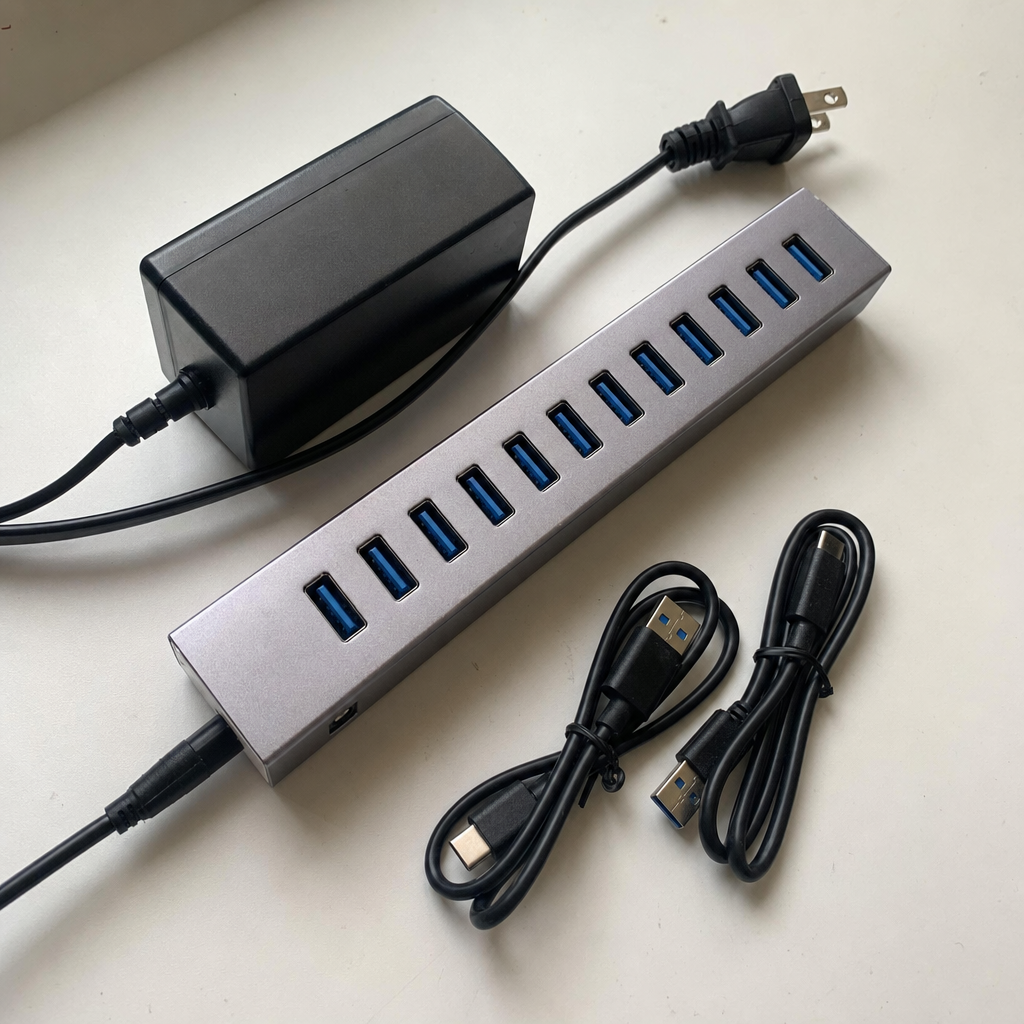
The hub ships with a 48W power adapter (12V, 4A) that ACASIS describes as an "Enhanced DC Power Adapter." This is the engine that makes everything else possible. Without external power, a hub can only draw the limited current available from a single USB port on a host computer enough for a flash drive, perhaps, but not for multiple charging devices, external hard drives, or power-hungry peripherals.
The 48W adapter changes the equation entirely. Each of the hub's ten ports can deliver up to 5V/1.5A for fast charging enough to power smartphones, tablets, e-readers, and other devices at a meaningful rate. The integrated surge protection, which ACASIS highlights as a core safety feature, guards both the hub and connected devices against power spikes. Hot-swap capability means users can plug and unplug devices without shutting down the system or risking data corruption.
"Integrated surge protection keeps your devices and data secure," the product listing notes, "while hot-swap capability allows easy connectivity." This language is deliberate. ACASIS is speaking to users who have lost work to unexpected disconnections a frustration that has become almost universal among anyone who has used a poorly-powered hub with an external hard drive.
The power adapter wattage 48W is worth noting for users who travel or have limited desk space. The adapter is not small, but it is manageable, and the trade-off between size and capability is one that most power users accept willingly. The alternative a bus-powered hub that cannot charge devices or reliably power multiple drives is a compromise that serious workstation users typically reject.
Speed and Standards: What USB 3.2 Actually Means
USB standards have a naming problem. USB 3.0, USB 3.1 Gen 1, USB 3.1 Gen 2, USB 3.2 Gen 1, USB 3.2 Gen 2 the terminology has evolved faster than consumer understanding, leaving many buyers uncertain about what they are actually purchasing.
The ACASIS hub operates at USB 3.2 Gen 2 speeds, which translates to a theoretical maximum of 10Gbps (gigabits per second). This is the current sweet spot for consumer connectivity fast enough to handle 4K video transfers, large photo batches, and external SSD workflows without bottlenecking the host computer's capabilities.
Real-world performance numbers, as documented in the product specifications, show lab-verified speeds of 894MB/s for write operations and 836MB/s for read operations. These figures represent sustained transfer rates, not peak burst speeds, and they place the ACASIS hub firmly in the performance tier that serious content creators require. A photographer importing a day's worth of RAW files, a video editor moving footage between drives, or a developer syncing large repositories will find these speeds adequate for daily workflows.
The Walmart product listing for the ACASIS hub frames this capability as part of a 2025 upgrade cycle, noting that the hub represents an "upgraded" generation of the company's USB 3.2 hardware. The language reflects a broader industry trend toward higher data rates and more robust power delivery a trend that ACASIS has positioned itself to meet with this and other models in its hub lineup.
Individual Control: The Case for Per-Port Switching
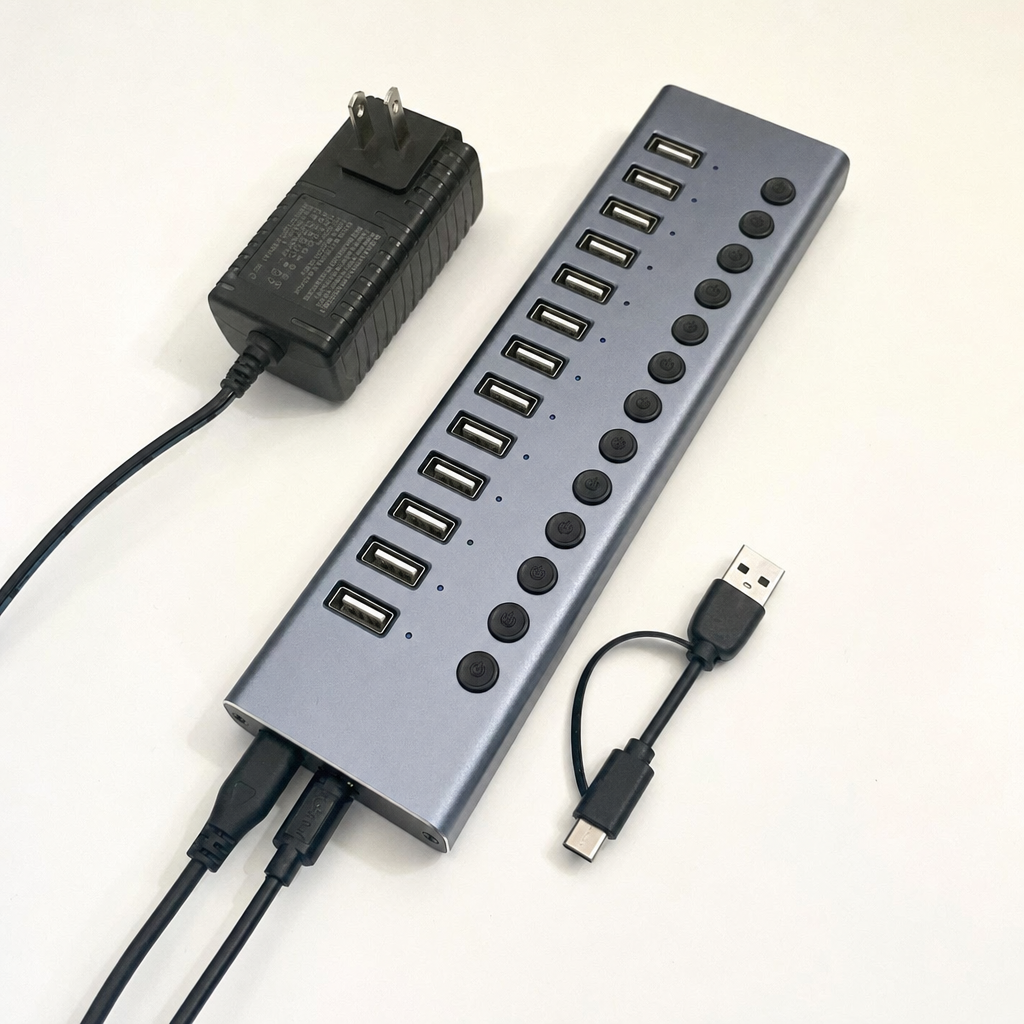
Among the hub's most distinctive features is one that many buyers initially overlook: each of the ten ports has its own independent on/off switch. This is not a common feature in the USB hub market, where most devices offer a single power switch for the entire unit or no switch at all.
The individual switches serve several practical purposes. A user can power down a card reader after importing files without disconnecting the cable. A developer can toggle a specific USB device on and off to trigger a reset without affecting other connected hardware. A photographer can isolate a problematic device without disrupting an entire workflow. These are small conveniences, but they compound over time and for users who spend hours at their desks, they represent a meaningful reduction in friction.
"Gain enhanced control and convenience with individual switches for each 10Gbps port," the product description states. "Easily turn devices on or off without unplugging cables, adding an extra layer of security and ease to your workflow."
The switches also serve a power management function. Turning off a port that is not in use eliminates any standby draw from that device a minor but real benefit for users conscious of energy consumption. In a workstation context, where devices often remain connected for days or weeks at a time, even small power savings add up.
Compatibility: The Universal Promise
Cross-platform compatibility is one of the ACASIS hub's strongest selling points. The device supports Windows XP, Vista, 7, 8, 10, and 11 on the PC side, and MacOS 8, 9, and X on the Apple side. Beyond those mainstream operating systems, the hub also supports UNIX and Linux, making it one of the more broadly compatible options available in the powered USB hub market.
This breadth of compatibility matters for several user groups. Enterprise IT environments often run mixed-OS networks where hardware needs to function across multiple platforms without custom drivers or configuration. Creative professionals may work across Mac and Windows machines and need peripherals that travel seamlessly between them. Developers working in Linux environments need hardware that the operating system recognizes without manual intervention.
The hub achieves this compatibility through true plug-and-play functionality. According to the product specifications, no driver installation is required the hub is recognized by the operating system automatically upon connection. This is the standard behavior for USB hubs, but the implementation matters: some hubs require specific drivers for certain operating systems or certain port configurations. ACASIS has opted for the simpler, more universal approach.
The ACASIS hubs collection page reflects this product-line strategy, offering hubs in various port configurations 16-port, 10-port, 7-port, and 6-in-1 multiport adapters across different USB generations and price points. The 10-port model sits in the middle of this range, balancing port count against price and power delivery in a configuration that ACASIS appears to have designed for the power-user workstation market.
Safety, Certification, and the Protection Plan Question
Power delivery at scale requires safety infrastructure. The ACASIS hub has earned certification from FCC, UL, CE, and UKCA four of the most recognized safety and electromagnetic compliance standards in the global electronics market. These certifications are not marketing labels; they represent testing and verification by independent laboratories that the device meets specific electrical safety thresholds.
The inclusion of surge protection within the hub's circuitry addresses a real-world risk that many users discover only after a power event damages a connected device. External hard drives, in particular, are vulnerable to data loss during power surges, and a hub with integrated surge protection adds a layer of defense that standalone power strips cannot always provide.
Beyond the hardware certifications, ACASIS offers software-level protection through Walmart's optional protection plans. The 2-Year Plan, priced at $5.00, and the 3-Year Plan, priced at $7.00, are administered through Walmart and provide coverage for defects and malfunctions beyond the standard 30-day refund window. The hub also ships with a 2-year product warranty directly from ACASIS, according to the company's official policies.
For buyers purchasing through Walmart, the protection plan option adds a layer of financial security that some users find valuable particularly those who rely on the hub as a critical piece of daily infrastructure. The pricing is modest relative to the hub's cost, and the coverage terms are administered by Walmart's existing claims process.
What This Means for ACASIS Readers
If you are evaluating a powered USB hub for a multi-device workstation, the ACASIS 10-port model addresses several pain points simultaneously. The combination of ten ports (five USB-A and five USB-C), 48W of total power delivery, per-port charging up to 5V/1.5A, individual on/off switches, and 10Gbps transfer speeds represents a configuration that covers most common workstation scenarios without requiring multiple hubs or external power splitters.
The aluminum housing and thermal management design matter for long sessions a hub that runs cool is a hub that lasts. The broad OS compatibility means you are not locked into a single platform or forced to reconfigure hardware when switching machines. The independent switches add a level of workflow control that power users consistently report as surprisingly valuable once they have it.
At the current price point $47.49 as listed on Walmart the hub sits in the mid-range of the powered USB hub market, offering more ports and more power than budget models while remaining more affordable than enterprise-grade docking stations. For users who need ten ports, 48W of power, and individual control, the value proposition is clear.
Design Philosophy and the ACASIS Approach
ACASIS Electronics has been manufacturing connectivity hardware since 2008, according to the copyright notice on the company's official website. That fourteen-year history in the peripheral market has produced a product line that spans hubs, capture cards, network cards, and storage devices a range that suggests a company focused on the infrastructure layer of computing more than the glamorous front-end devices that dominate consumer tech coverage.
The hub lineup on the ACASIS website reflects this infrastructure focus. Models range from the 16-port hub at the high end to compact 5-in-1 adapters designed for MacBook users. The 10-port model occupies a middle position not the most ports, not the fewest and the feature set (individual switches, 48W power, aluminum housing) suggests a design philosophy oriented toward workstation utility more than minimalism or portability.
The company maintains active sales channels through Amazon, Walmart, and its own direct-to-consumer store, with separate contact paths for technical support, order service, influencer collaboration, and wholesale inquiry. This organizational structure with distinct email addresses for different functions indicates a business that has moved beyond the startup phase into operational maturity, with established processes for customer service and product support.
Real-World Performance and the 894MB/s Write Speed
Lab-verified numbers deserve context. The 894MB/s write speed and 836MB/s read speed cited in the product specifications represent performance under controlled conditions a specific host system, specific test files, and specific cable quality. Real-world performance will vary based on the devices connected, the cables used, the host computer's USB controller, and the nature of the data being transferred.
That said, these numbers are meaningful benchmarks. A sustained write speed of 894MB/s is sufficient to transfer a 50GB video project folder in roughly one minute. A sustained read speed of 836MB/s allows a photographer to import a day's worth of RAW files in a matter of minutes more than the longer waits associated with USB 3.0 (5Gbps) or USB 2.0 (480Mbps) hardware.
For users whose workflows involve large file transfers video editing, photography, software development, data backup these speeds represent a meaningful productivity improvement over older USB standards. The ACASIS hub's USB 3.2 Gen 2 implementation delivers on the promise of those standards in a way that bus-powered hubs often cannot, because the 48W external power supply ensures that the host computer's USB controller is not throttled by power limitations.
Charging Capability: What 5V/1.5A Actually Delivers
The per-port charging specification of 5V/1.5A (7.5 watts) is worth understanding in practical terms. This is not the 15W, 25W, or 100W charging that modern USB-C Power Delivery standards can deliver it is a more modest rate that reflects the hub's design as a data hub first and a charger second.
At 7.5W, the hub will charge smartphones and tablets at a reasonable rate faster than a computer's USB port alone, but not as fast as a dedicated wall charger. This is typical behavior for powered USB hubs. The hub's charging capability is best understood as a convenience feature beyond a primary function: it keeps devices topped up during work sessions without requiring separate charging bricks for every device on the desk.
Users who need faster charging for specific devices a smartphone that supports 25W or 45W fast charging, for example will still want to use a dedicated charger for those devices. But for the ambient charging needs of a workstation keeping a phone at 80% during a workday, maintaining battery levels on tablets and e-readers, powering devices that do not need full-rate charging the hub's per-port power delivery is adequate and convenient.
Build Quality and the Aluminum Housing Advantage
USB hubs come in plastic housings and metal housings, and the difference matters more than many buyers realize. Plastic is lighter and cheaper, but it conducts heat poorly, which means the hub's internal components rely more heavily on airflow and less on passive thermal dissipation. Metal housings and aluminum alloy in particular conduct heat away from internal components more effectively, keeping temperatures lower during sustained operation.
The ACASIS hub's aluminum alloy housing is described in the product specifications as promoting "efficient heat dissipation and long-lasting durability." The robust design, the listing notes, "ensures stable connections across multiple devices, resists drops, and prevents overheating and unexpected disconnections."
For a device that is likely to remain powered on for hours or days at a time as most workstation hubs do thermal management is not a minor consideration. Overheating is a leading cause of hub failures, device disconnections, and data corruption. A metal housing that stays cool under load is a meaningful durability advantage over plastic alternatives.
Where to Read Further
For readers who want to explore the ACASIS 10-port hub in more detail, the product listings on Amazon's ACASIS hub page and Walmart's ACASIS hub page provide full specifications, customer reviews, and current pricing. The ACASIS hubs collection on the company's official website offers a broader view of the product lineup, including alternative port configurations and related connectivity hardware.
For readers evaluating USB standards and compatibility requirements, the USB Implementers Forum (usb.org) maintains the authoritative specifications for USB 3.2 and related standards, including data rate definitions, power delivery requirements, and connector specifications.
For readers comparing protection plan options, Walmart's plan terms and claims process are documented on the product listing page, with 2-year and 3-year coverage available at checkout for $5.00 and $7.00 respectively.
Summary: The Hub as Infrastructure
The ACASIS 10-port USB 3.2 hub is not a glamorous device. It will not appear in product launches or earn breathless reviews from tech media. It is infrastructure the kind of hardware that makes other hardware work, that stays out of the way, that does its job reliably for years without requiring attention.
For power users who have spent time hunting for ports, managing power delivery to multiple devices, or dealing with disconnections from underpowered hubs, the appeal is straightforward: ten ports, 48W of power, individual switches, and aluminum build quality at a price point that does not require a corporate IT budget. The ACASIS hub answers the questions that matter does it need external power, how fast is it, can it charge devices, does it have individual switches, is it compatible with my system, and how much power does the adapter deliver with clear, documented answers that make the buying decision easier.
That is the quiet work of a well-designed hub. And for the power users who need it, it is exactly enough.